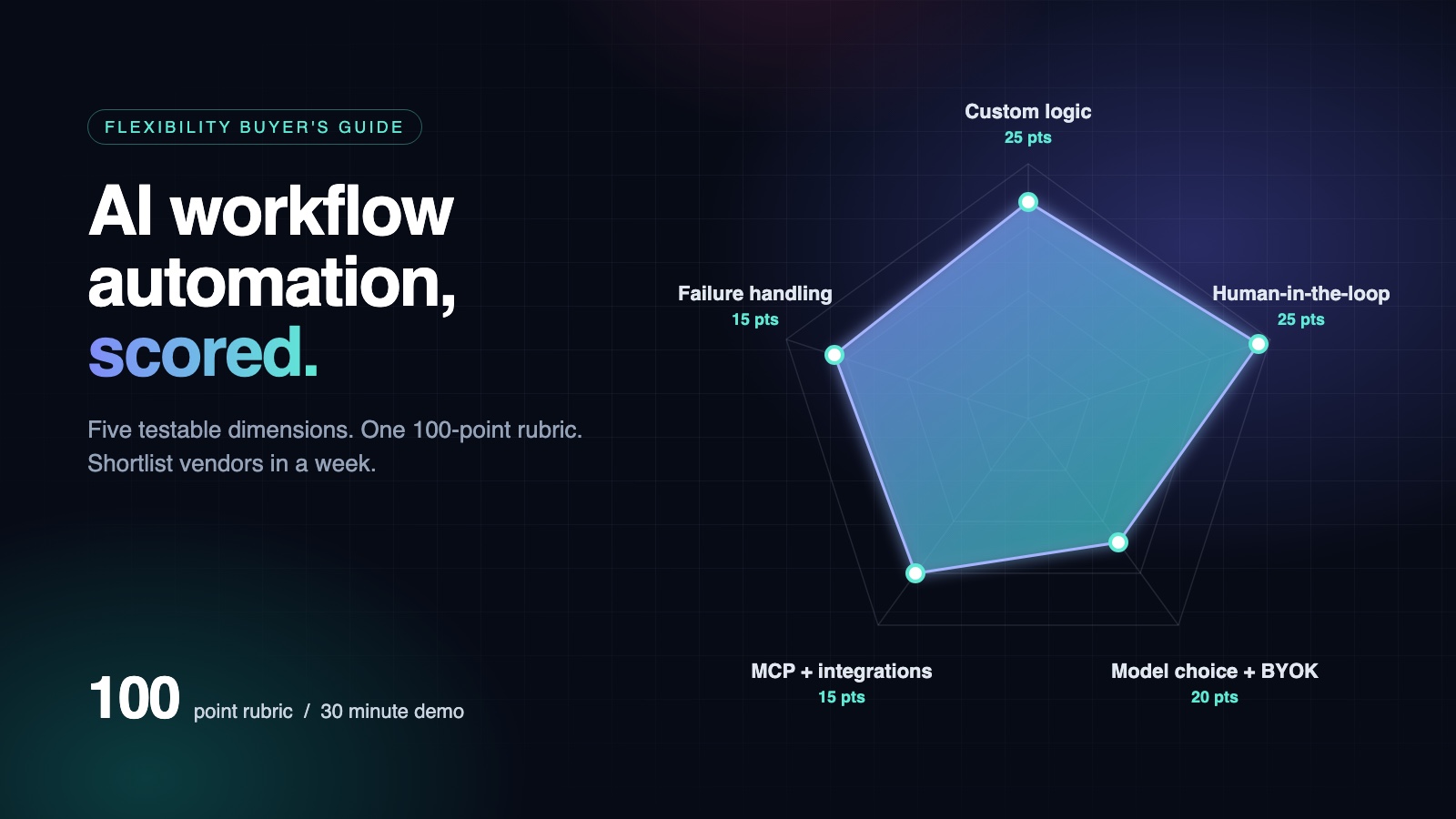
Score AI workflow automation vendors on five testable dimensions with a 100-point flexibility rubric and a 30-minute demo checklist.
The best AI workflow automation platform for a founder-led team is the one that gives you the most control over custom logic, human-in-the-loop approvals, and model choice, not the longest feature list. This guide scores platforms on a 100-point flexibility rubric and gives you a demo checklist to shortlist vendors in a week.
What is AI workflow automation, and how is it different from traditional workflow automation?
Traditional workflow automation follows fixed rules: trigger A produces action B, every time, with no judgment. AI workflow automation hands a step to a model that reads context, decides how to do the work, and produces output a human then reviews. That difference is why "flexible" means something new here.
- Logic: traditional automation runs hardcoded rules; AI workflow automation lets the model decide per run.
- Inputs: traditional takes structured data only; AI takes unstructured text, docs and email.
- Failure mode: traditional stops at the edge case; AI produces confidently wrong output.
- Control: traditional is deterministic by design; AI needs an approval queue.
The last row is the trap. Agentic platforms such as Crost pitch agentic workflows for solo founders (crosthq.com), so the question shifts from "can it connect?" to "can I inspect and approve what it does before it ships?" That is the evaluation lens we apply throughout this guide, and the rubric behind it is on our blog.
What makes an AI workflow automation platform 'flexible' enough for agentic workflows?
Flexibility in AI workflow automation comes down to five testable dimensions: custom logic, human-in-the-loop control, model choice, integration depth, and failure handling. If a vendor scores poorly on two or more, you will hit a wall within your first month of real usage.
Custom logic: can you branch without a developer?
Look for conditional branching, loops, and error paths you can edit yourself. If a workflow can only run top-to-bottom with fixed steps, one exception (a refund, a bounced email, an out-of-stock supplier) breaks it. Ask the vendor to modify a branch live in the demo.
Human-in-the-loop: where does approval sit in the flow?
An approval queue should be a first-class step, not an afterthought bolted onto notifications. You want to delegate the work, then approve the output before anything ships: an email draft waits for your yes, a calendar post holds until you sign off. Platforms that force you to choose between no oversight and pausing everything fail this test. We covered a practical approval-loop setup in our agentic workflow trial win-back guide.
Model choice: BYOK and MCP versus vendor-locked models

Bring-your-own-keys means you pick the model per task and control cost and data flow. BYOK typically means supplying keys for the major model providers, whose APIs are documented at OpenAI's API docs and Anthropic's API docs. MCP connectors let agents reach your tools directly; the protocol spec lives at modelcontextprotocol.io. A platform locked to one vendor's model caps both quality and your bargaining power on price.
The remaining two dimensions, integration depth and failure handling, are where most demos hide their weaknesses, so probe them explicitly.
How do you evaluate AI workflow automation platforms before committing budget?
Score every candidate against the same 100-point flexibility rubric instead of comparing feature checklists. The allocation reflects what actually breaks first for a founder running agentic workflows: custom logic and branching (25 points), human-in-the-loop controls like approval queues and acceptance tests (25 points), model choice including BYOK (20 points), MCP connectors and integration depth (15 points), and observability plus rollback when an agent goes sideways (15 points). Anything that cannot show you all five in a live demo scores zero for that dimension, no matter what the landing page promises.
The rubric exists because flexibility is the dimension vendors blur most. A platform can ship 400 integrations and still force every agent run through one hardcoded model with no approval gate, which is fatal when the agent is emailing your customers. Weighting custom logic and human-in-the-loop control at 25 points each forces the conversation onto the two things you cannot retrofit later: whether the execution layer accepts your own keys and your own acceptance tests, and whether every action waits for your yes. The same criteria apply to AlexDLY, and where it falls short today, say so in your notes: MCP connector coverage is narrower than the integration counts larger platforms advertise. Score Crost, Fleece AI, Helm, and Organ on identical questions, and check tier limits on each vendor's pricing page before you shortlist. The same discipline applies when you design the workflows themselves, as covered in agentic sales workflows for solo founders.
How to run the rubric in a 30-minute vendor demo
Spend the first 10 minutes on a live edit: change a branch condition mid-workflow and watch whether the running version or the draft version executes. Spend the next 10 minutes on the approval queue: submit a real action, reject it, edit the output, and confirm the audit trail shows who did what. Spend the last 10 minutes on model choice: connect your own API key, switch models on an existing step, and verify the connector list includes MCP. Ask the vendor to score themselves against the rubric on screen; a vendor who refuses is telling you where the gaps are.

How do the main platforms score on flexibility?
Most direct competitors in this segment, including Crost, Fleece AI, Helm, and Organ, position around founder-led delegation, so the differentiator is rarely the pitch and usually the mechanics: how much custom logic you can write, how granular the approval queue is, and whether you can swap models per step. Ask each vendor to show a workflow where one step needs a different model or a manual sign-off mid-run. If the demo can't do that in five minutes, the flexibility claim is marketing.
Scoring AlexDLY against its own rubric
AlexDLY scores well on human-in-the-loop control by design: agents run the work, every action waits for your yes, and the approval queue plus acceptance tests give you a concrete gate before output ships. BYOK and MCP connector support cover model choice and integration depth for a technical operator.
Where it falls short: if your workflow needs heavy branching logic or conditional paths written in code, a delegation-and-approval platform is not an execution engine, and you'll feel that limit. If your bottleneck is approval overhead rather than logic complexity, that trade works in your favor.
When should you choose free AI workflow automation tools versus paid platforms?
Free tiers work while you're testing one or two workflows with low run volume. They break at founder scale on three things: run limits that cap how many tasks agents execute monthly, weak approval queues so you can't gate every action behind a yes, and no BYOK, which means you're paying the platform's model markup instead of your own API keys.
Choose paid once agents touch revenue work like sales follow-up or a content calendar, where a failed run costs a customer, not a test. Paid platforms also earn their keep on human-in-the-loop control: AlexDLY's approval-first execution and BYOK model choice are the features worth paying for at this stage (see AlexDLY's product and pricing). For how approval gates work in practice, see safe agentic follow-up for SMBs.
How much human-in-the-loop control do you need in AI agent workflow automation?
Map every task your agents touch on two axes: reversible vs irreversible, and internal vs customer-facing. Reversible internal work (drafting a content calendar, enriching a CRM record) can run with spot-check approvals. Customer-facing or irreversible actions (sending invoices, deleting records, publishing to your site) deserve a hard approval queue where nothing ships without your yes.

A practical starting split: auto-run anything reversible and internal, queue anything a customer sees, and block anything destructive until you've watched the agent do it correctly several times. Loosen gradually, not on a timer.
This is where platforms differ sharply. AlexDLY is built around that pattern: agents run the work, every action waits for your approval, and you stay in the loop by default. That is more friction than tools letting agents fire freely, which is the point when the work touches real customers. Crost, Fleece AI, Helm, and Organ each draw the human-in-the-loop line differently, so ask in every demo exactly which actions can execute without a click.
Which integration and security questions should you ask every vendor demo?
Ask these before any trial, and score yes/no answers:
- MCP: "Do you support MCP connectors, and can I point them at my own MCP servers?" If agents can only reach the vendor's prebuilt integrations, your workflows stop where their catalog stops.
- BYOK: "Can I bring my own API keys for OpenAI, Anthropic, and Google?" BYOK keeps model costs on your billing and lets you swap models per workflow instead of per platform.
- Data residency: "Where do prompts, outputs, and logs live, and can I pin them to a region?" Get the answer in writing.
- Audit logs: "Does every agent action produce an immutable log entry showing what ran, with which key, and who approved it?" If approvals live in a Slack thread instead of a log, you cannot reconstruct an incident.
- Failure path: "When a step fails mid-workflow, what happens to the half-completed job?"
A platform that answers all five honestly, including where it falls short, is worth a pilot. For expected time savings from the workflows you would connect, the AlexDLY ROI calculator lets you model defaults for a three-person team at $50k/mo before you commit budget.
How do you calculate ROI from AI workflow automation before purchase?
Work it from hours reclaimed at your own rate. Take one delegated workflow, say a weekly content calendar: if an agent plus a 10-minute approval queue saves you 4 hours a week and your founder time is worth $100/hour, that's roughly $1,600 a month from a single workflow. Stack two or three workflows and a $50-200/month tool pays for itself in the first week.
Be honest about hidden costs: setup time, prompt tuning, and the review burden of checking agent output. If approvals eat more than 20% of the hours saved, the workflow isn't ready to delegate.
Run your own numbers with the site's ROI calculator, which defaults to a team of 3 at $50k/mo revenue for a Founder / Operator role. If the payback period is under a month, buy; if it's over a quarter, fix the workflow design first.

What is AI workflow automation?
It is automation where a model handles a step instead of a fixed rule. The agent reads context, decides how to do the work, and produces output a human reviews before it ships. Traditional automation stops at edge cases, but AI workflows handle unstructured inputs like email and documents, failing by being confidently wrong, which is why approval queues matter.
What is the best AI workflow automation platform for solo founders?
The best platform scores highest on five flexibility dimensions: custom logic, human-in-the-loop control, model choice, integration depth, and failure handling. Score Crost, Fleece AI, Helm, Organ, and AlexDLY against a 100-point rubric in live demos. AlexDLY leads on approval-first execution, though its MCP connector coverage is narrower than larger platforms.
Are there free AI workflow automation tools that support BYOK?
Free tiers rarely include BYOK, meaning you pay the platform's model markup instead of using your own API keys. They also cap monthly runs and typically offer weak approval queues. Free tiers suit testing one or two low-volume workflows. Once agents touch revenue work like sales follow-up, a paid platform with BYOK and approval gates earns its keep.
How do AI agents workflow automation tools handle human approval?
The better ones treat approval as a first-class workflow step. An email draft or calendar post waits for your yes before anything ships, and every action lands in an audit log showing what ran and who approved it. Map tasks by reversibility and audience: auto-run reversible internal work, queue anything customer-facing, and block destructive actions until the agent succeeds repeatedly.
Is agentic AI workflow automation safe for customer-facing tasks?
Only with a hard approval queue where nothing ships without your explicit sign-off. An agent emailing customers or publishing to your site can be confidently wrong, and a 400-integration catalog does not fix that. In every vendor demo, ask exactly which actions can execute without a click. If approvals consume more than 20% of the hours saved, redesign the workflow before delegating further.
See what your own site is missing
A free website review: one crawl, no account. You get the score and the worst of what we find.
Review my site